CTV Overlay Ads for Live Streaming
How CTV overlay ads run during live content or on top of a stitched spot, and how publishers keep them from covering the action.
A CTV overlay ad is a graphic or interactive unit drawn over part of the video while the content keeps playing. The IAB Tech Lab defines overlays as nonlinear ads during program content, outside the traditional ad break. On live streams, overlays can run as standalone inventory or on top of a stitched 30-second spot.
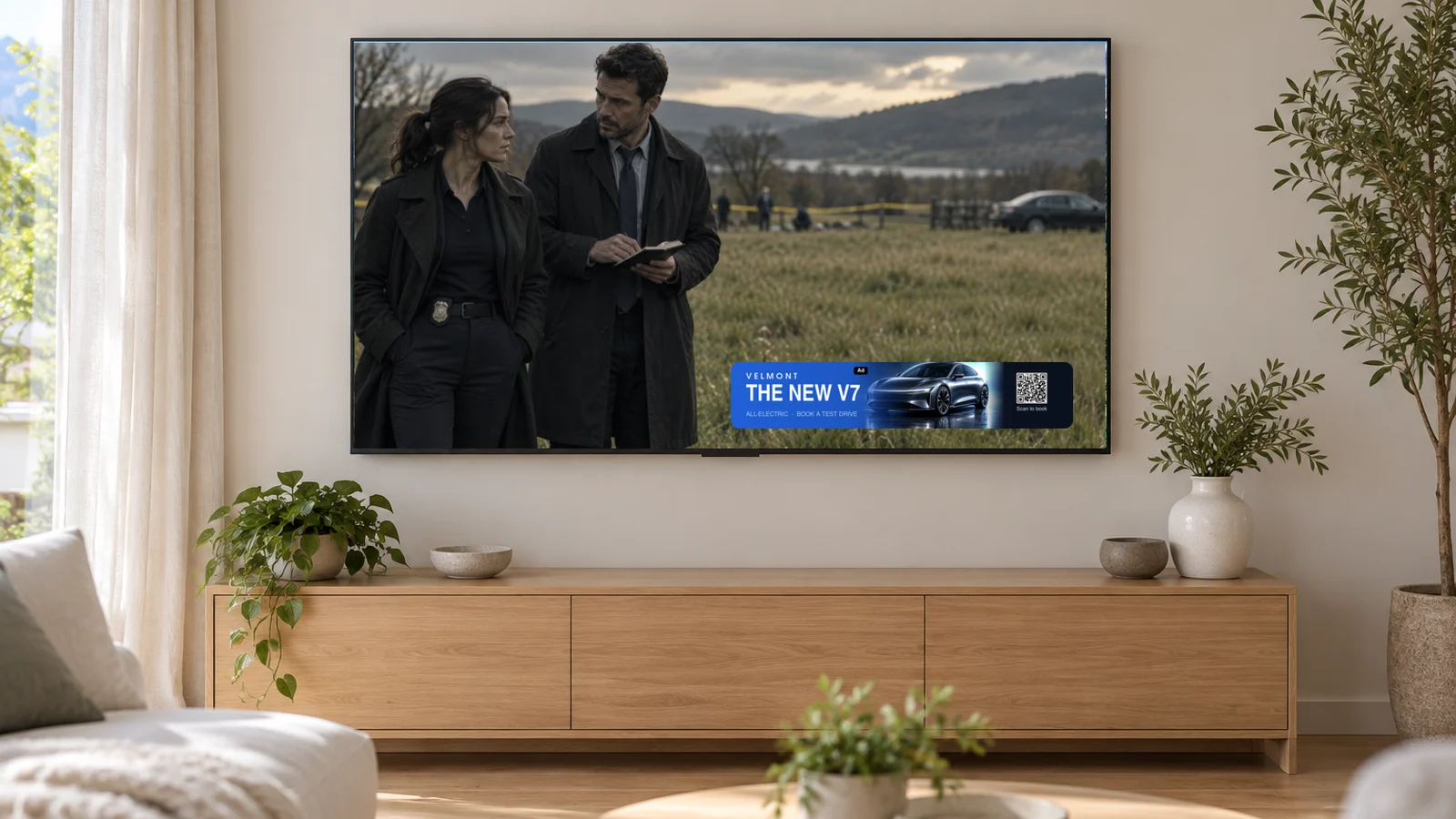
What is an overlay ad on CTV?
An overlay places a creative on top of the full-size picture, usually along the bottom. Unlike a squeezeback, it does not resize the video, so part of the picture is covered.
The IAB Tech Lab CTV Ad Portfolio describes overlays as "non-linear ads occurring during program content and outside of the traditional ad break." It adds that the format "places ad creatives over top of the program content." The definition was finalized on July 22, 2026.
Overlays are also the classic VAST nonlinear ad. The IAB's VAST 4.1 sample overlay tag carries a static image, a click-through URL and click tracking inside a NonLinear element.
What is the difference between standalone overlays and overlays on a stitched spot?
A standalone overlay runs during the program itself. An attached overlay runs on top of a video ad that is already playing. They serve different buyers and different moments.
Standalone overlays during live content. These create new inventory inside the program, without a break. In Moment Ads, Overlay and Full-Screen Overlay are presentation formats, alongside units such as Lower Third, Insight and Poll. They run around selected high-interest moments or lulls while the game continues. Moment Ads can carry live data such as scores, stats and live odds.
Overlays attached to a stitched spot. These add interactivity to a standard 30-second video ad. With Interactive SSAI, the SSAI provider keeps stitching and delivering the spot. Timed metadata markers trigger a StreamLayer layer rendered by the SDK. The Bottom Banner Overlay is a transparent layer over the lower part of the SSAI ad. It can show a logo, a CTA, an optional QR code and promotional messaging. The layer can be personalized even when the stitched video is the same for everyone.
Two narrower formats also sit over the video: banner ads run as a strip across the bottom of the screen, and lower third ads follow the broadcast graphics convention.
A standalone overlay competes with the game for attention. An attached overlay sits on the advertiser's own video, so the risk of covering the action does not arise.
How do you keep overlay ads from covering the action?
Control four things: placement, safe areas, duration and frequency. Then add closing rules for key moments.
- Placement. Keep overlays low and to one side. Map where each sport's action happens, because the ball, the puck and the play area sit in different parts of the frame.
- Safe areas. Keep clear of the score bug, the clock and the broadcaster's graphics. Remember that TV overscan and caption areas vary by device.
- Duration. Keep standalone overlays short, and close them automatically when play resumes.
- Frequency. Cap overlays per event and per viewer. Space them out so they do not become part of the picture.
In Moment Ads, these are publisher controls for eligibility, timing, pacing, placement and closing. Moment Intelligence identifies opportunities from live game context and live data. It does not trigger ads on its own. Publisher rules decide which moments become ads. Operators can also activate units manually from StreamLayer Studio.
If covering any part of the picture is unacceptable, use a squeezeback, such as a side-bar or an L-bar squeezeback, instead. Squeezebacks resize the video rather than covering it.
How are CTV overlay ads delivered?
There are two main paths. The player's ad SDK can render a VAST NonLinear creative, or a dedicated SDK can render the overlay from server-side decisions.
The VAST path is standard, but player support for nonlinear rendering varies. Check it across every device in your mix. The SDK path is how StreamLayer works. In StreamLayer SGAI, server services make the decision and the StreamLayer SDK renders the overlay in the app. The video stream is not modified, and the system works alongside existing SSAI, CSAI and ad servers.
For programmatic sales, the finalized IAB format signaling lets bid requests identify overlay inventory, as PPC Land reported.
Frequently asked questions
Do overlay ads interrupt the program?
No. The program keeps playing and the overlay covers only part of the picture. That is what makes it a nonlinear format.
How do viewers interact with an overlay on a TV?
They can select a CTA with the remote, scan a QR code or request a link by phone or email. On mobile and web, they tap the overlay directly.
Can an overlay run on top of an SSAI ad?
Yes. Interactive SSAI adds a Bottom Banner Overlay to a stitched spot. The SSAI provider keeps delivering the video, and timed metadata triggers the StreamLayer layer.
Is an overlay the same as a lower third?
A lower third is a type of overlay that runs across the lower part of the screen. Moment Ads offer Lower Third as a separate ad unit.
For the full range of formats, see nonlinear ads for streaming. To plan overlays for live events or stitched breaks, talk to StreamLayer.