Full-Screen Pause Ads: Full-Bleed Ads on Pause
How full-screen (full-bleed) pause ads work on CTV, when to choose them over overlay or side-bar layouts, and how they are sold.
A full-screen pause ad, also called a full-bleed pause ad, fills the whole screen when a viewer pauses streaming video. It appears after a publisher-defined delay of 1 to 5 seconds, uses still imagery or subtle, silent motion, and closes as soon as playback resumes. It is the largest of the three StreamLayer Pause Ads layouts.
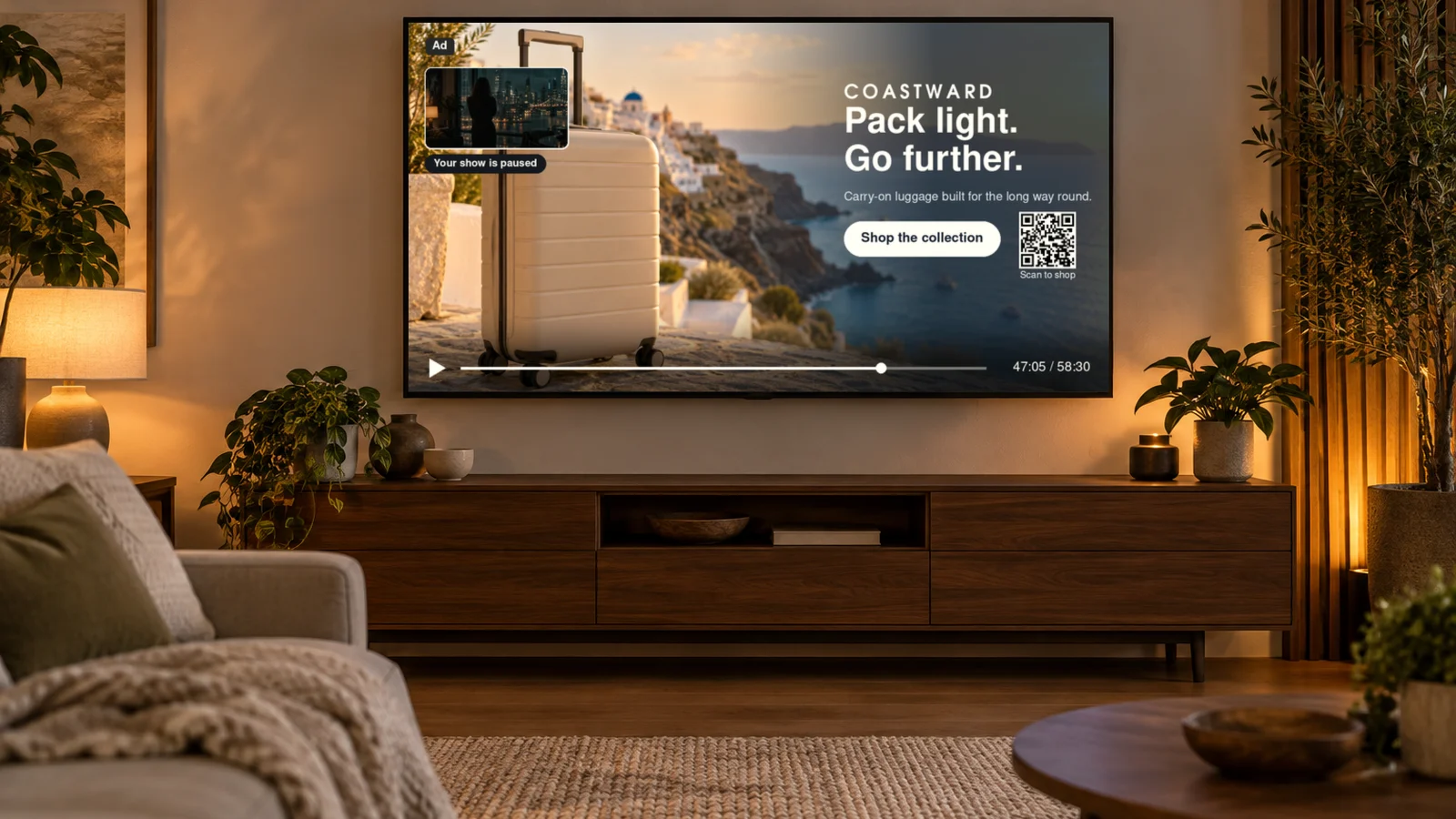
How does a full-screen pause ad work?
The viewer pauses, the app waits a short delay, and then the ad covers the paused frame until the viewer presses play. Nothing is inserted into the video stream.
The IAB Tech Lab CTV Ad Portfolio defines a pause ad as "a TV ad experience initiated when the viewer uses a remote to pause the content being watched." The full-screen layout applies that idea to the entire display.
With StreamLayer Pause Ads, the work is split cleanly.
- The host app owns the player and sends pause and resume signals to the StreamLayer SDK.
- The publisher sets the delay, from 1 to 5 seconds, so that brief or accidental pauses do not trigger an ad.
- The StreamLayer SDK renders the creative client-side inside the app and takes remote focus while the ad is interactive.
- StreamLayer Studio manages campaigns, creative, pacing, eligibility and reporting.
When the viewer resumes, the ad closes and playback continues from the same point. Because the video is never modified, the approach works alongside existing SSAI, client-side ad insertion, ad servers and players.
When should a publisher choose full-screen over overlay or side-bar?
Choose full-screen when the advertiser needs the largest canvas and the paused frame does not need to stay visible. Choose overlay or side-bar when viewers should still see where they stopped.
StreamLayer Pause Ads come in three layouts.
- Full-screen. The creative fills the display and hides the paused frame. It suits brand takeovers, product imagery, shoppable units and trivia that need room for text and options.
- Overlay. The creative sits on top of part of the paused frame, which stays full size. It is lighter and keeps the scene in view. See overlay ads on CTV.
- Side-bar. The paused frame is resized, and the creative fills a panel beside it. This is the pause version of a squeezeback. Nothing covers the picture, and the host app resizes the video.
In practice, publishers weigh four factors. The first is how much of the scene viewers expect to see while paused. The second is what creative advertisers can supply at full-screen sizes. The third is buyer specifications, which vary by DSP and deal. The fourth is device support, because layout options differ by platform. A publisher can offer more than one layout and let each campaign choose.
What types of full-screen pause ads are there?
StreamLayer Pause Ads come in four types, and each can run in the full-screen layout.
- Standard. Brand imagery with a message and an action, such as a CTA or QR code.
- Sports Stats. Sponsored live data, such as the score and game state, stats leaders or league standings.
- Trivia & Poll. A sponsored question that the viewer can answer with the remote while paused.
- Shoppable. Products the viewer can browse and act on without leaving the app.
The data-enhanced lineup is called Pause Ads+. It is powered by Moment Intelligence, which draws on live game context and live data.
What can viewers do with a full-screen pause ad?
Viewers can act on the ad with the remote, their phone or email, without losing their place in the program.
- CTA buttons that the viewer selects with the remote.
- QR codes that the viewer scans with a phone.
- Send-to-phone or send-to-email requests that deliver a link for later.
- Shopping flows for shoppable units.
- An in-app browser that opens advertiser content inside the app.
The full-screen layout gives these actions the most room. That matters on a TV, where text must be legible from across the room and every step uses a remote.
How are full-screen pause ads sold?
Full-screen pause ads can be sold programmatically through the publisher's configured SSP and DSP partners, through private marketplace (PMP) deals, or directly.
Programmatic buyers need to recognize pause supply in the bid request. IAB Tech Lab finalized signaling for its CTV formats, including pause, in July 2026, as PPC Land reported. Deal terms can then specify the full-screen layout and its creative rules. StreamLayer supply can also reach buyers through Curated.Media curated supply and PMP deals. For the full process, see programmatic pause ads.
Direct-sold campaigns suit sponsorships, such as a brand that owns every full-screen pause during a series or event. They can be trafficked in StreamLayer Studio or the publisher's ad server.
How is a full-screen pause ad different from a full-screen overlay in live programming?
A full-screen pause ad runs only when the viewer has paused. A Full-Screen Overlay in Moment Ads runs during live programming while the program continues.
Moment Ads are activated around selected high-interest moments or relevant lulls. Publisher rules control eligibility, timing, pacing, placement and closing. The viewer did not choose to stop, so the publisher decides when the overlay may appear and when it must close. With a pause ad, the viewer's own pause starts the ad, and resuming ends it. Both are nonlinear formats. For the full set, see nonlinear ads.
Frequently asked questions
What is a full-bleed pause ad?
It is a pause ad whose creative runs to every edge of the screen, with no visible border or program frame. Full-bleed and full-screen describe the same layout. It appears after a short delay when the viewer pauses and closes when playback resumes.
Do full-screen pause ads play sound?
StreamLayer Pause Ads use still imagery or subtle, silent ambient motion. The viewer has paused the program, so the ad does not play audio.
Can a full-screen pause ad be interactive on a TV?
Yes. Viewers can select CTA buttons with the remote, scan a QR code, request a link by phone or email, shop, or open an in-app browser. The StreamLayer SDK handles remote focus while the ad is on screen.
Does a full-screen pause ad cover the paused scene?
Yes. The full-screen layout hides the paused frame until the viewer resumes. If the scene should stay visible, publishers can use the overlay or side-bar layout instead.
For a broader introduction, read the complete guide to pause ads on CTV. To plan full-screen pause inventory across your apps and devices, talk to StreamLayer.